Arratech Connect · Connect Explained · Invites

Organisation invites, step by step

Follows one person from the invitation an administrator sends to a membership of the organisation. The left column is what happens in the Connect Portal. The right column is the same outcome as API calls. Every step ends with where the invitation now stands.

Verified against tenant-service main, 2026-10-06Portal arratech-admin main, 2026-10-06Email notification-service main, 2026-10-06

The two ways into an organisation

Creating your own organisation makes you its administrator on the spot, with no invitation involved — that path is unchanged and is covered by Create an Organisation. Every other way of joining goes through an invitation that the invited person accepts. The one exception is Arratech staff, who can add an existing user to an organisation directly.

An administrator can invite people to their own organisation. A superadmin can invite into any organisation, including one that has no administrator yet — which is how an organisation created by Arratech gets its first one.

An invitation stays pending until it is accepted, cancelled, or lapses. There is no decline action: an ignored invitation simply runs out after 14 days. The window counts from the last link sent, so inviting the same address again starts it over.

ADMIN INVITED PERSON Invite someone address and role → email sent Open the link from the invitation email Sign up or log in the invitation rides along Cancelled an admin cancels Lapsed 14 days, no answer Pending waiting to be accepted Good for 14 days One pending invitation per address Inviting again replaces the link Accepted member of the organisation invited again — new link, the previous one stops working
An invitation is pending until the invited person accepts it, an administrator cancels it, or 14 days pass. Inviting the same address again replaces the link on the pending invitation rather than creating a second one. The numbered boxes are the steps below, in this order; cancelling and lapsing are the two ways a pending invitation ends instead.
01
Admin

Invite someone

An address and a role are all it takes. The invitation is bound to the address, not to whoever holds the link, and the person does not need an Arratech account beforehand.

State after this step
Pending
Connect Portal

Members → Add Member

Organisation administrators only. The screen opens on what adding a member now means: an invitation goes out by email, the person joins by following the link, and their name comes from what they enter when they sign up.

The next screen asks for the email address and the role — Member or Administrator — then sends it.

To send a link again, invite the same address again. There is no separate resend action.
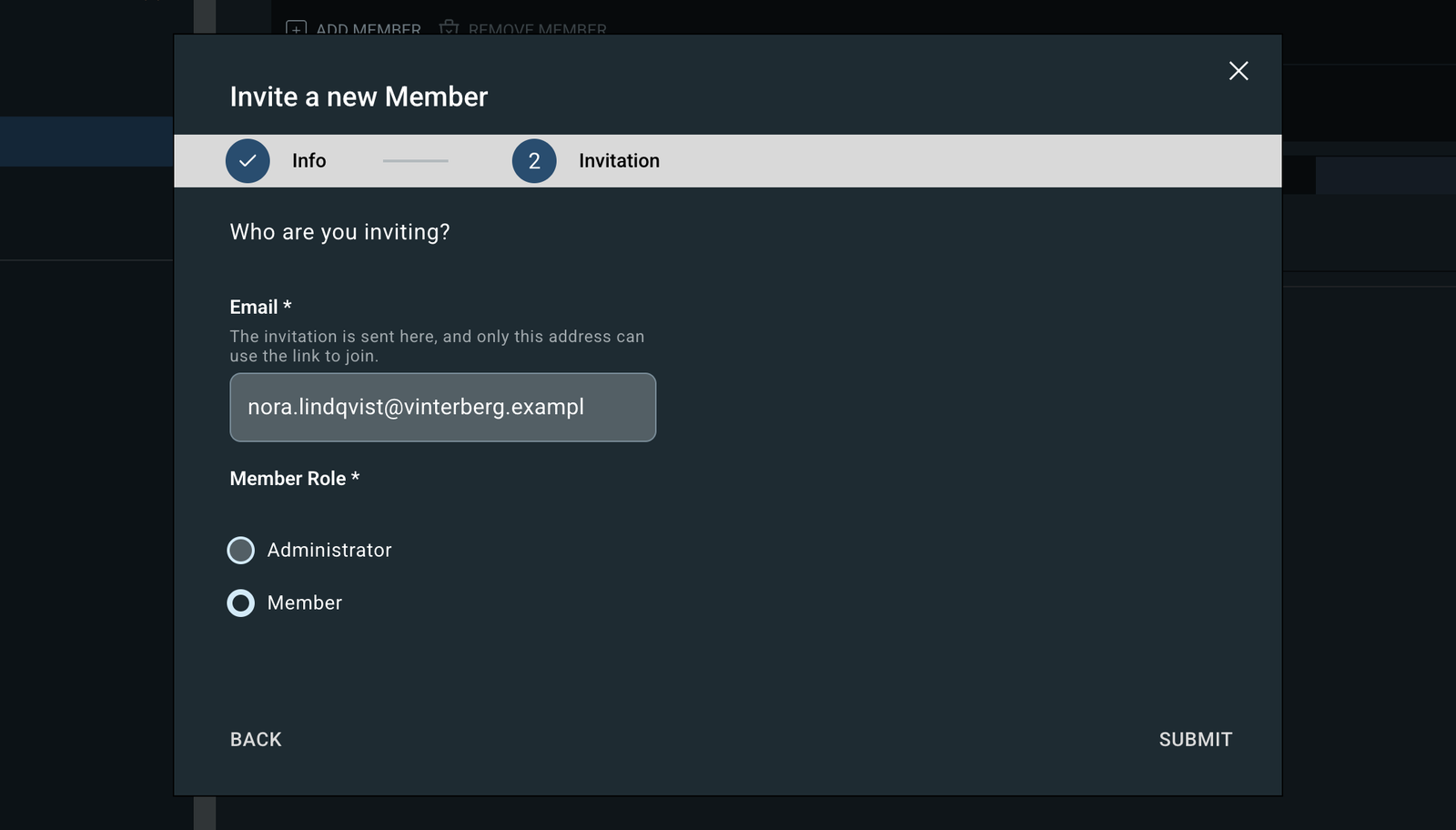
The Invite a new Member dialog, with an email address filled in and the Administrator role selected.
The address and the role are all it asks for. The invitation goes out when you submit.
After sendingWhat is shown
A new invitation“Invitation sent!”, with the address and role.
The address already had one pending“A new invitation link has been sent. The earlier link no longer works.” This is also how a wrong role is put right.

The Invitations tab

The Members page has two tabs. Members lists people who have joined; Invitations lists those who have not. They stay side by side rather than merged — someone who has not accepted has no member record behind them, only an address and a role.

Only pending invitations are listed. Cancelled ones are not, and accepted ones have become members. With nothing waiting: No one is waiting to accept.

Cancel Invitation

One at a time, from the Invitations tab. The confirmation says plainly what it does: the link in the email stops working and the person can no longer join with it, and they can be invited again at any time.
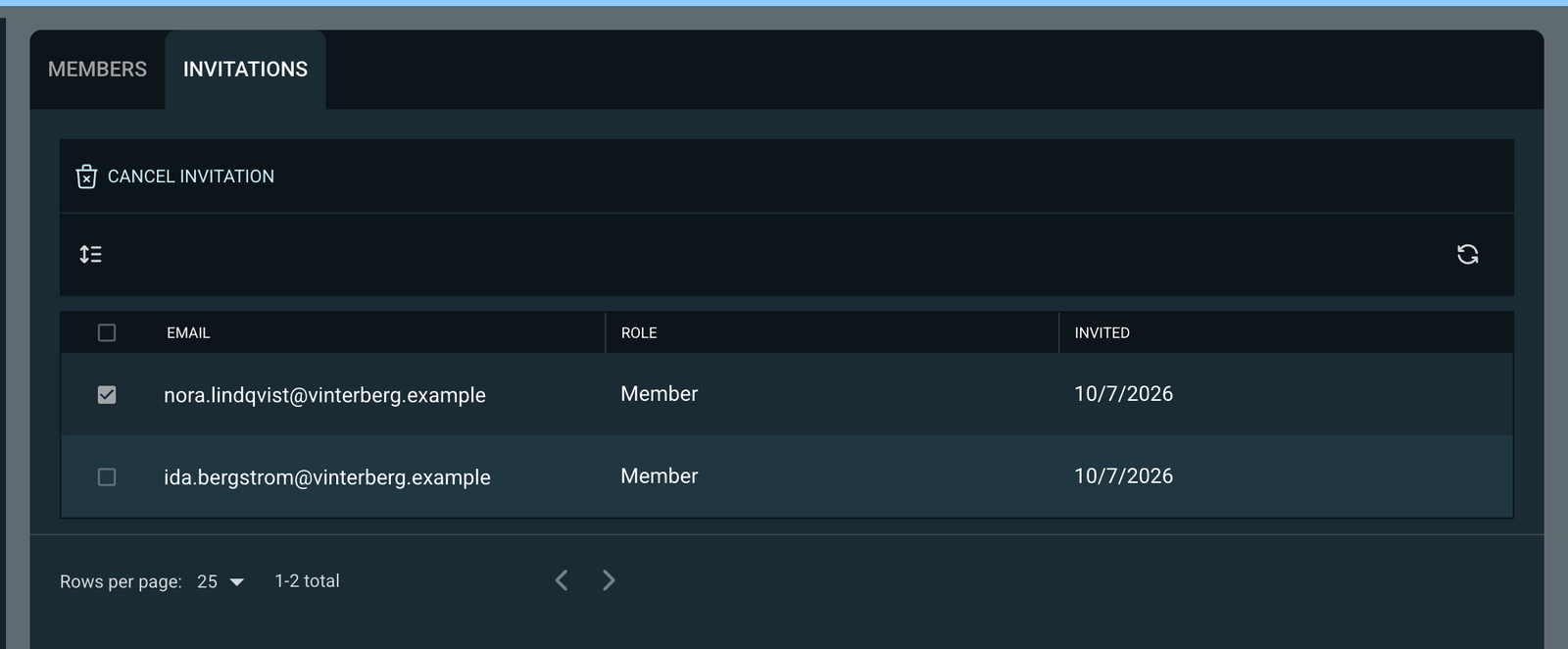
The Invitations tab listing one pending invitation, with Cancel Invitation above it.
The Invitations tab. Only pending invitations are listed, and Cancel Invitation acts on the one that is selected.

From the superadmin side

Creating an organisation under Add Org ends with an optional Administrator step. Fill in an address and the new organisation’s first administrator is invited straight away; leave it blank and the organisation is created with nobody able to manage it until someone is invited later.

Because that is two separate operations, the result is reported honestly: the organisation is created either way, and if the invitation could not be sent, the dialog says so and points at the organisation’s Members page.

API
POST/orgs/{orgId}/invitesorgadmin
{
  "email": "nora.lindqvist@vinterberg.example",
  "role": "orgadmin"
}

201 Created   a new invitation
200 OK        the pending one was reissued

Naming the person

GivenWhat the invitation holds
An address with no account yetThe address. No account reference until it is accepted.
An address that has an accountThe address, resolved to that account.
An account referenceThe account, and the address taken from it.
NeitherRefused.

Checked in this order

CheckIf it fails
1The organisation exists and is not the root organisationRefused
2The account exists, when one was namedUser not found
3The person is not a superadminRefused
4The person is not already a member hereRefused
5No invitation is already pending for the addressThat one is reissued

Being a member of a different organisation is not a blocker. A person can belong to several.

Inviting the same address again

The pending invitation keeps its identity and gets a new token, the role from this request, and a fresh 14 days. The previous link stops working. Only the status code distinguishes it — the body is the invitation either way.

The email

Sending is part of this call: the invitation is written first and the email goes out before the call returns, so a reissue cannot leave someone holding a dead link and no replacement.

The email names the organisation, who invited them, the role offered and how long the link lasts. A reissue says so in its own subject line.

If it never arrives, there is nothing to look up and resend: invite the address again, which sends a new link.

The link is the only place the raw token exists. It is never in an API response, never logged, and only its hash is stored.

Listing invitations

GET/orgs/{orgId}/invites?status=pendingorgadmin

Without the filter the list holds every invitation the organisation has ever had. An unrecognised value is ignored rather than refused.

Cancelling

DELETE/orgs/{orgId}/invites/{inviteId}orgadmin
CaseAnswer
PendingCancelled, with the moment recorded. The address can be invited again.
Already accepted or cancelledRefused
No such invitationNot found
Racing an acceptanceThe acceptance wins; the cancellation is refused.

Errors

CodeReason
AT-1164The person is a superadmin
AT-1041Already a member of this organisation
AT-1174Invitation not found
AT-1175Invitation is no longer pending
sharedUser not found · organisation not found · root organisation forbidden · address or account required
02
Invited person

Open the link

The link names the organisation and the invitation and carries a token. Nothing is written just by opening it.

State after this step
nothing written
Connect Portal
/invites/{orgId}/{inviteId}?token=…&email=…
Who opens itWhat happens
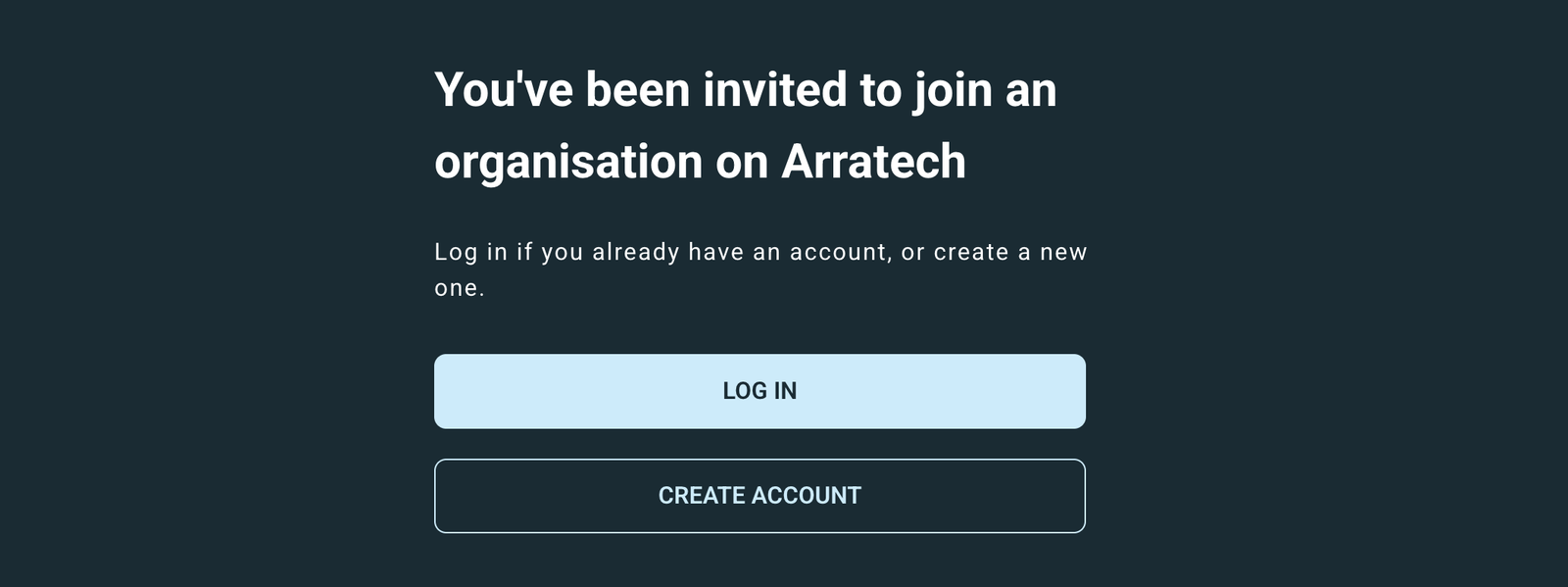
Signed out“You’ve been invited to join an organisation on Arratech”, with **Log in** and **Create account**. The invitation travels with them.
Signed inAcceptance starts by itself — “Adding you to the organisation”. There is no Accept button.
A link with no token“This invitation can’t be used.”
The invite landing page while signed out, offering Log in and Create account.
Opened while signed out. Both buttons carry the invitation through.

A mail scanner that fetches the address without running scripts leaves the invitation untouched. Acceptance only happens from a request the browser makes afterwards — which is why accepting is not a plain link.

API

No call. The page reads the link and decides what to show.

What the link carries

The organisation, the invitation and the token — enough to read the invitation directly. The address is carried too, only so the wrong-account message can name it.

The token never lands in the browser’s history.

03
Invited person

Sign up or log in

Signing in clears browser storage, so the invitation travels in the address bar instead.

State after this step
nothing written
Connect Portal

Creating an account

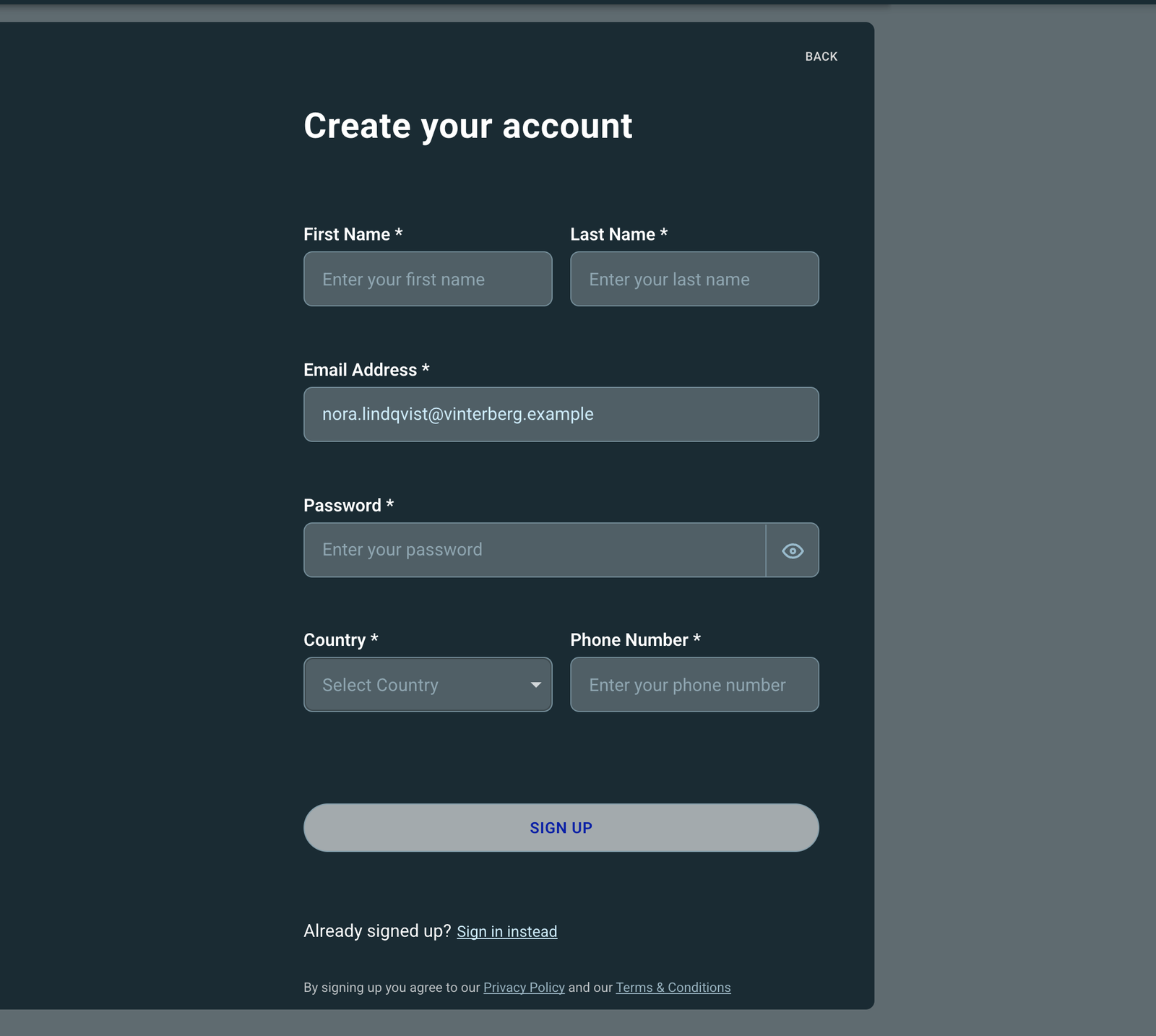
  • The address is fixed to the one invited and cannot be edited.
  • The company questions are hidden — the organisation already exists.
  • After confirming the address, the person is signed in automatically and returned to the invitation. If that does not work, they are sent to log in with the invitation kept.
The sign-up form reached from an invitation, with the email address filled in and not editable.
Signing up from an invitation: the address is fixed to the one invited, and the company questions are gone.

Already have an account

Trying to sign up with an address that already has an account says You already have an account. Log in to accept the invitation and moves them to the log-in screen with the invitation kept.

A carried invitation beats the usual “no organisations yet” redirect, so a brand-new account lands on the invitation rather than on a prompt to create an organisation of its own.

API

No call. Accounts are created by signing up, not by the platform — which is why joining an organisation always needs an invitation the person accepts.

The account record

It is written when the address is confirmed. Acceptance in the next step needs it, and answers not ready if it asks a moment too early.

04
Invited person

Accept

One all-or-nothing write turns the invitation into a membership.

State after this step
Accepted
Connect Portal

The page sends the token by itself. On success it waits until the new membership is actually listed before opening the organisation, because the read of the person’s own profile lags slightly behind the write.

If it still is not listed, the page says “You’re in” and offers Check again. That is deliberate wording: they have joined, and only the read is behind — telling them it failed would be untrue.

The invite page showing "Adding you to the organisation" with a spinner.
The working state. The page sends the token itself and waits for the new membership to be listed before opening the organisation.

When it does not go through

What the person seesWhen
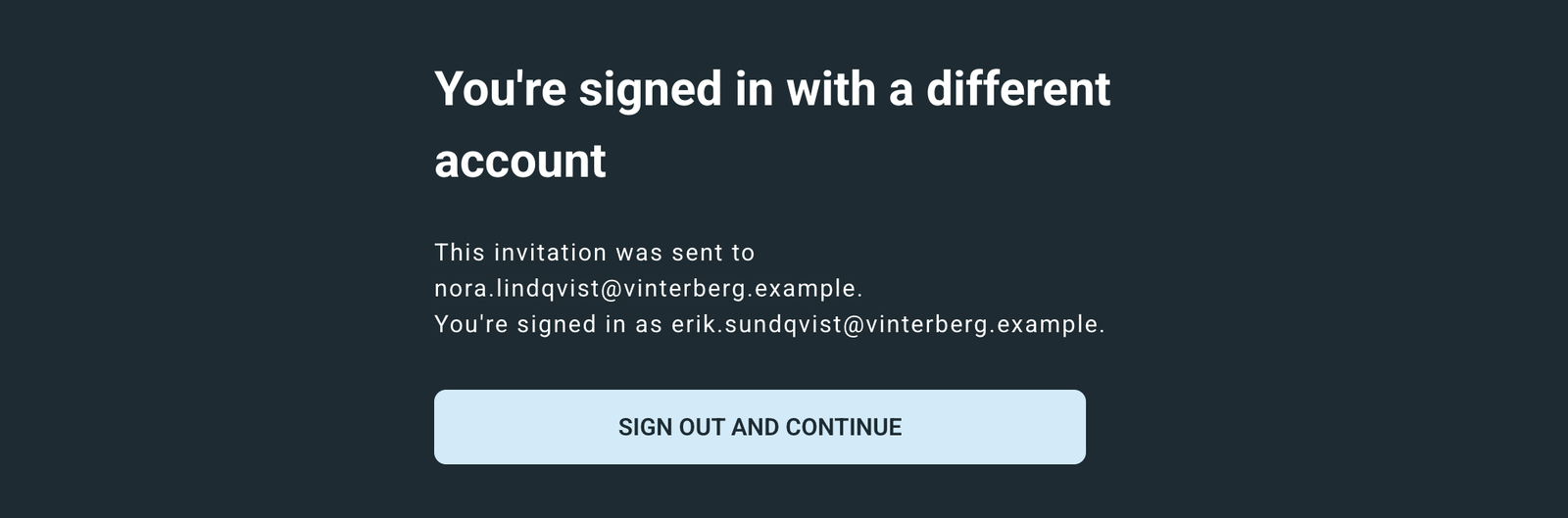
“You’re signed in with a different account”, naming the invited address, with **Sign out and continue**The signed-in address is not the invited one. The address shown comes from the link, since the answer carries no fields.
“This invitation is no longer valid. Ask the organisation’s admin to send a new one.”Unknown, cancelled, lapsed, already used by someone else, or a wrong token.
“We couldn’t add you just yet”, with **Try again**Something temporary. The page retries three times, backing off, before showing this.
The invite page saying you are signed in with a different account, naming the invited address, with a Sign out and continue button.
The invited address comes from the link, not from the answer.
The invite page saying this invitation can’t be used.
A link with no token. The same panel appears for one that has been cancelled, has lapsed, or was already used.
API
POST/orgs/{orgId}/invites/{inviteId}/redeemuser
{ "token": "…" }

200 OK
{ "orgId": "…", "role": "orgadmin",
  "legalName": "Vinterberg Logistik AB" }

No API key. The token in the body and the signed-in account’s address are what authorise it. Anything beyond token in the body is refused outright.

What the write does

Three things, all of them or none:

  • the invitation becomes accepted, recording who accepted it and when;
  • the member record is written, with the role from the invitation;
  • the person’s list of organisations gains this one.

Addresses are compared in lower case, so capitalisation in the invitation makes no difference.

Repeating it is safe: opening the link twice, or refreshing part-way through, simply confirms the membership the first attempt made.

Someone who is already a member keeps the record they have. A second invitation to the same address is simply settled, and no further member record is written.

Other outcomes

CaseAnswerCode
Unknown invitation, or a wrong tokenNot foundAT-1174
Cancelled, lapsed, or already used by someone elseNo longer pendingAT-1175
You accepted earlier but have since been removedNo longer pendingAT-1175
The signed-in address is not the invited oneMismatch, naming the invited addressAT-1176
Signed in as a superadminRefusedAT-1178
Not settled yetNot ready — worth retryingAT-1177

A write that loses a race is re-read and answered as a success, as a refusal, or as worth retrying — so a caller never has to tell those races apart.

A wrong token answers exactly like a missing invitation. Neither the answer nor its timing reveals which invitations exist, so a link cannot be used to probe for them.

Reference

Where an invitation can be, what it can answer, and what can be called.

What the state means

StateMeaning
pendingSent and waiting. The only state anything can happen from, and refused once its 14 days have passed.
acceptedThe person joined. Records who accepted it and when.
revokedAn administrator cancelled it. Records when.

There is no expired or declined state. A lapsed invitation is simply a pending one that has run out.

Error codes

CodeReasonHTTP
AT-1164Cannot invite a superadmin400
AT-1041Already a member409
AT-1174Invitation not found404
AT-1175No longer pending422
AT-1176Account mismatch403
AT-1177Not ready, retryable503
AT-1178A superadmin cannot accept403

Endpoints

MethodPathLowest role
GET/orgs/:orgId/invitesorgadmin
POST/orgs/:orgId/invitesorgadmin
DELETE/orgs/:orgId/invites/:inviteIdorgadmin
POST/orgs/:orgId/invites/:inviteId/redeemuser

There is no resend call. Inviting the same address again is what reissues the link.

Three things worth knowing

They explain most of the decisions above.

The link exists only in the email

Only a hash of the token is stored. Nobody can read a link back out of the system — not support, not an administrator looking at the Invitations tab. It is never logged and never kept in browser history.

Accepting repeats safely; inviting again does not

Opening the link twice, refreshing part-way through accepting, or double-clicking all succeed — the second attempt simply reports the membership the first one made. Inviting the same address again is the opposite: it replaces the token, and the link already sent stops working. The portal says so on the confirmation.

The two sides see different things

An administrator sees the address, the role, who sent the invitation and when — never the link. The invited person sees only what the link carries until they are in, and learns the organisation’s name from the answer that admits them.